
eWallet Guide
Steps to Top Up and Withdraw on A9 eWallet
Learn how to deposit and withdraw from your A9Play eWallet casino account.

Here are the steps to top up and withdraw your a9 play eWallet casino games on your mobile device once you have familiarized yourself with the process after reading the steps to register a9play here.
Check out the following a9play ewallet top-up methods so that you can understand how they work and start playing a9 play eWallet casino games and winning.
We will also cover the steps on how to withdraw from your a9play e-wallet after you win credit to your local bank in the steps below.
Steps to Top Up on a9play eWallet
Step 1: Log in to your A9 Play eWallet
Step 2: Click the "Deposit" menu shown on the screen below, and choose the bonus promotion package you want.
Step 3: Choose your preferred payment method: online transfer, bank-in transfer, or e-wallet.
Step 4: Enter the amount and click confirm. You will be redirected to your bank login accordingly.
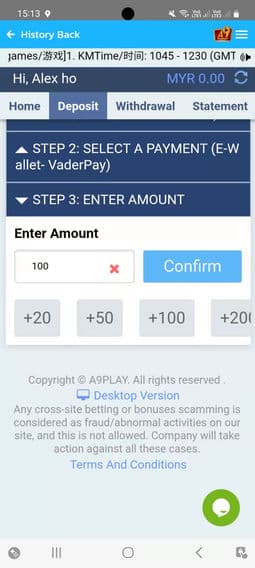
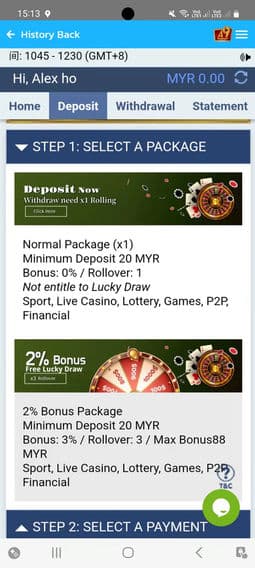
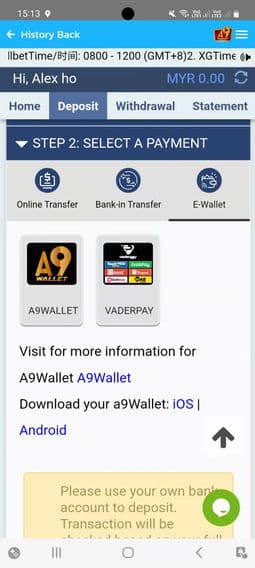
Video: How to Top Up on a9play
Steps to Make a Withdrawal on a9play eWallet
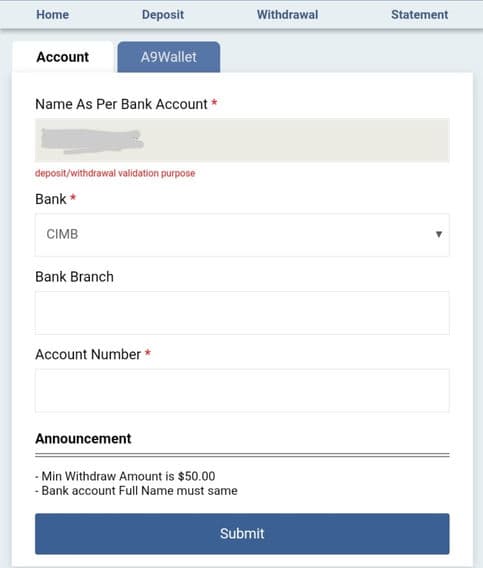
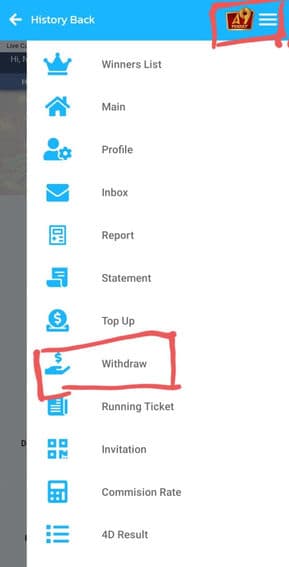
Step 1: Log in to a9play from the a9play app installed on your mobile.
Step 2: Click the "Withdrawal" menu as shown on the screen below.
Step 3: Next, select your bank and enter the details such as bank branch and account number. Then click the "Submit" button to submit your withdrawal request.
Note: The minimum withdrawal is RM50. The bank account's full name must match your A9Play account. For all withdrawals, if the status is still pending or in process, please wait 15 to 30 minutes.